OKD-CL
Object Knowledge Decomposition and Component-Labeled Dataset
- Deep learning models can achieve strong recognition performance, but their decisions may rely on irrelevant background features, making their reasoning difficult to interpret and generalize.
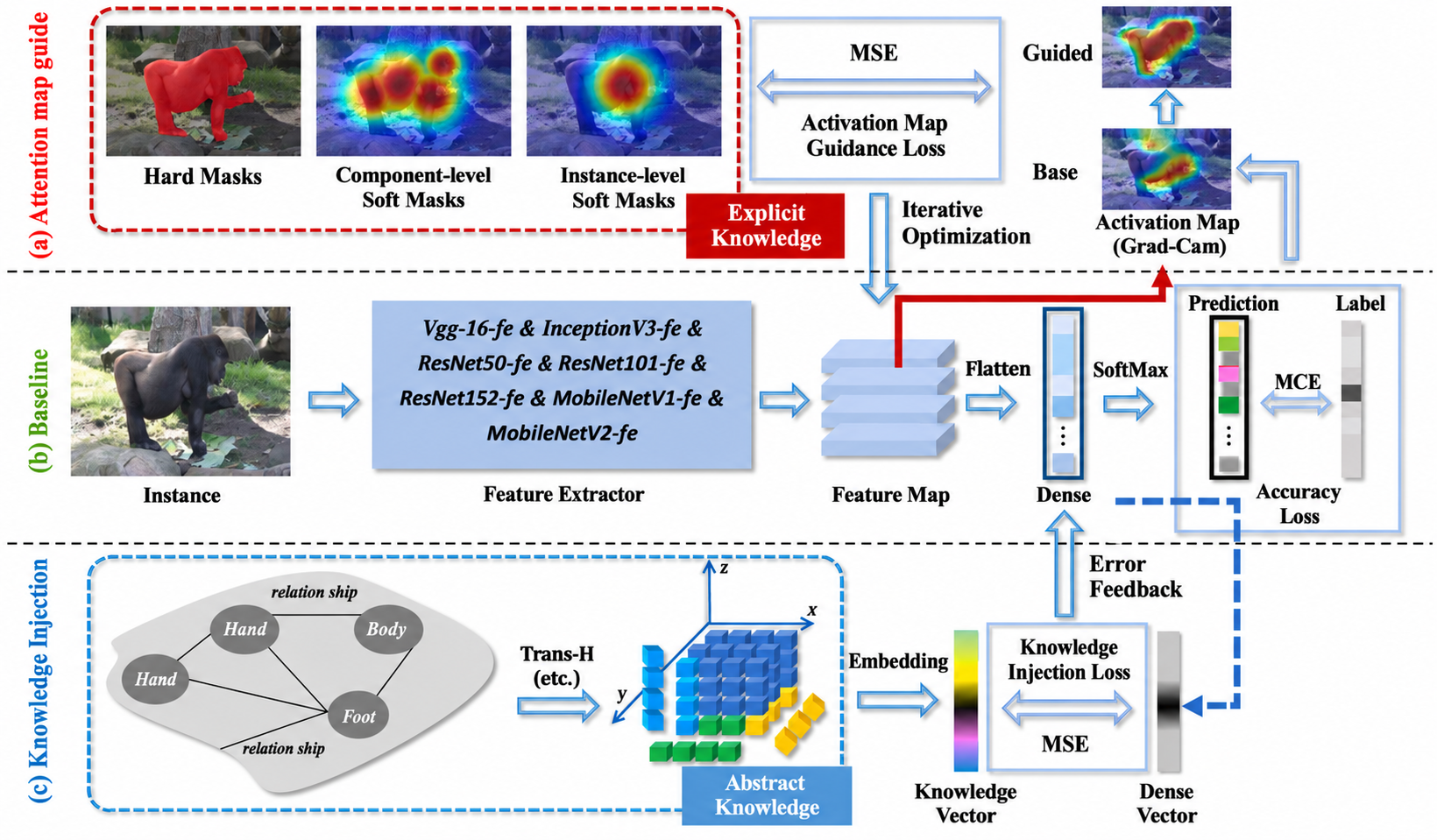
- OKD-CL addresses this problem by decomposing objects into meaningful components and combining two kinds of human-centric knowledge: Abstract Component Knowledge (ACK), which describes component attributes and relationships in natural language, and Explicit Visual Knowledge (EVK), which provides hard masks, instance-level soft masks, and component-level soft masks.
- With these visual and semantic knowledge representations, OKD-CL guides models to focus on meaningful object and component features rather than irrelevant background cues. The benchmark evaluates both classification accuracy (ACC) and Foreground Reasoning Ratio (FRR), which measures whether the model’s attention is concentrated on the foreground object.
- OKD-CL contains 99 object categories and 14,114 image instances, including 12,625 training samples and 1,489 testing samples. Our code and dataset are available at [https://github.com/XiGuaBo/OKD-CL](https://github.com/XiGuaBo/OKD-CL)
Submission Guidelines
OKD-CL Benchmark
1. Evaluation Data Format
After downloading and extracting the dataset, you will find the following files:
OKD-CL_dataset/
├── train/
├── test/
├── Hard_masks/
├── Instance-level_soft_masks/
├── Component-level_soft_masks/
└── class_mapping.json
train/: Training images. It contains 99 class folders named with official synsets, such asn02101006. Keep these folder names unchanged; do not rename them to numeric class IDs.test/: 300 test images named fromtest_000001.JPEGtotest_000300.JPEG. Run inference on these images.Hard_masks/: Hard masks for the training images. They may be used for training or analysis.Instance-level_soft_masks/: Instance-level soft masks for the training images. They may be used for training or analysis.Component-level_soft_masks/: Component-level soft masks for the training images. They may be used for training or analysis.class_mapping.json: The official class mapping file. Use itsclass_to_idmapping to convert synset classes to model output indices. Do not reorder the classes.
The classifier output must have 100 positions. There are 99 valid classes; index 38 is a reserved position and does not correspond to a valid class. Keep all 100 output positions. A prediction at index 38 is counted as an incorrect classification.
2. Submission Format
Submit one ZIP file. Its root must contain exactly the following four files.
Folder Structure
submission.zip
├── metadata.json
├── sample_ids.txt
├── scores.npy
└── cams.npy
Do not add an extra top-level directory, additional files, or model weights.
metadata.json: Basic information about the method.sample_ids.txt: One test sample ID per line. It must contain every ID fromtest_000001throughtest_000300exactly once. Its line order must match the first dimension order of both arrays below.scores.npy: Classification scores with shape[300, 100]and dtypefloat16orfloat32. Rowicorresponds to theith sample ID insample_ids.txt. The index with the maximum score is used as the predicted class.cams.npy: One CAM for every sample and output class, with shape[300, 100, H, W]and dtypefloat16orfloat32. The spatial dimensions must satisfy1 <= H, W <= 32. Examples include[300, 100, 7, 7]and[300, 100, 14, 14].
Example
Example metadata.json:
{
  "format_version": "1.0",
  "team_name": "Your team name",
  "method_name": "Your method name"
}
Example sample_ids.txt:
test_000001
test_000002
...
test_000300
Generate scores.npy and cams.npy from your model inference results.
3. Notes
Numeric values: scores.npy and cams.npy must not contain NaN or Inf.
Sample IDs: Test sample IDs must not be missing, duplicated, or unknown.
ZIP size: The total uncompressed size of the ZIP file must not exceed 128 MiB.
Evaluation: The website calculates and returns ACC and FRR from the submitted results.
Local Format Validation Tool
Before uploading, use the local validation tool to check the ZIP structure, required files, sample IDs, array shapes, and numeric format:
Download the file here: https://drive.google.com/file/d/1zw_gPlh5z_vnl5fJrYcHde6IQTstbTeZ/view?usp=drive_link
If needed, you can also download the file from the Baidu Netdisk link below.
Download the file here:
https://pan.baidu.com/s/13cW3YG2xUioLI3xsXKTDmA?pwd=vlp6
This tool is intended for pre-submission format checks. The website validation result for the uploaded file is final.